Outward Companion
Designed to make crafting friendlier in Outward (can be paired with a local mod on PC). LINKS available in the description.
[ CRAFTING APP ]
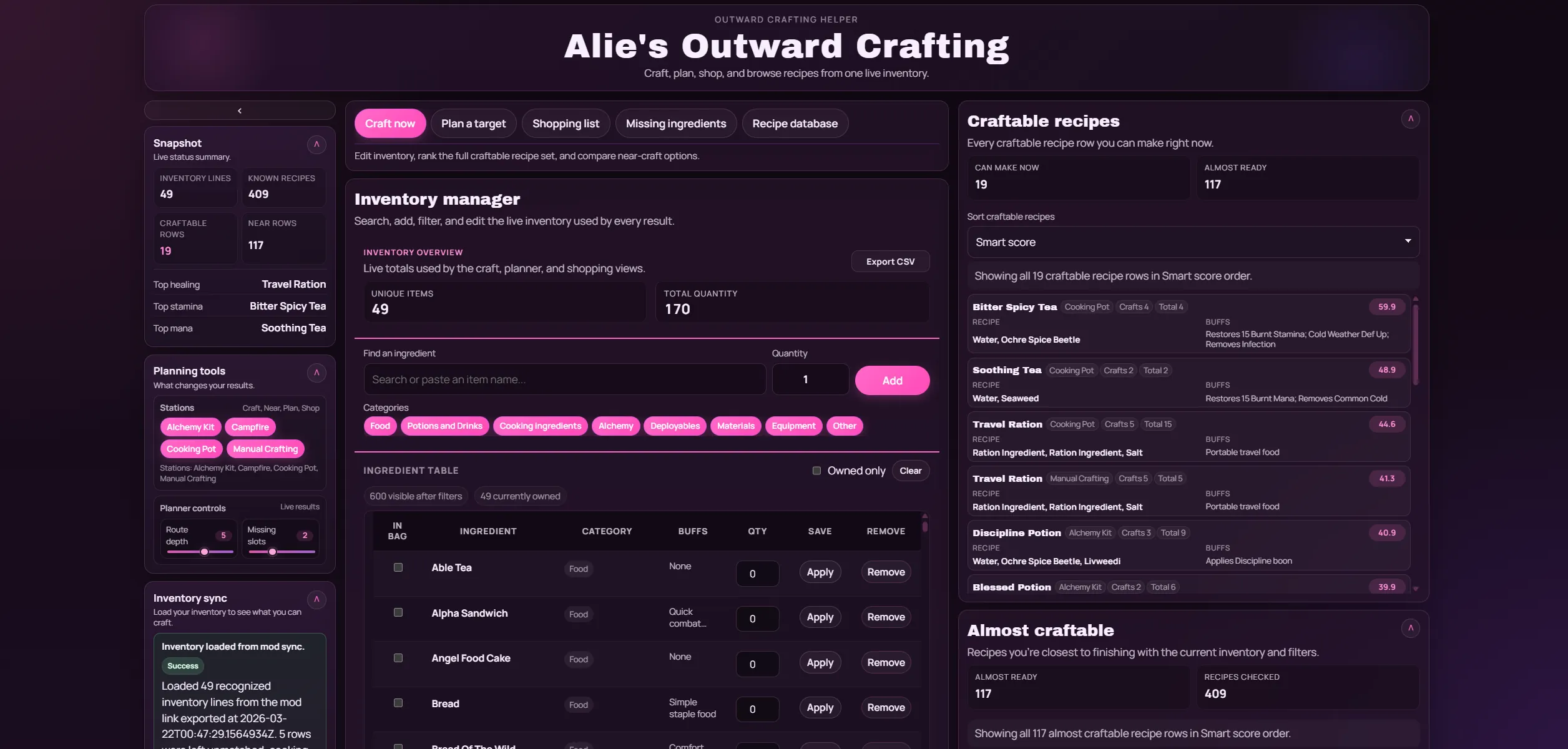
A browser-based crafting helper (available at: https://outwardcrafting.alixarchive.com ) for Outward that lets you:
• import your current inventory
• see what you can craft right now
• see what is almost craftable
• plan one target item
• build shopping lists
• browse the recipe database
What it does
The app helps you answer questions like:
• What can I craft right now with my bag?
• What am I only 1–2 ingredients away from crafting?
• What do I still need to make one more copy of an item?
• What should I buy or farm for a target recipe?
• What recipes exist for a given item or ingredient?
Main features
Craft now
• shows all currently craftable recipes
• ranks recipes by smart score and other sort options
• shows almost-craftable recipes separately
Plan a target
• checks whether you can make one more copy of an item
• shows what is still needed
• shows the closest route toward crafting it
Shopping list
• builds a missing-items list for multiple targets
Missing ingredients
• shows recipes that are close to completion
Recipe database
• searchable recipe browser
• optional debug section for recipe visibility logic
Manual inventory import
• CSV / Excel upload fallback
Mod sync support
• the Outward mod can open the app with a sync payload in the URL
• the app reads that payload and populates inventory automatically
[ THE GAME MOD ]
A small Outward mod (available at: https://www.nexusmods.com/outward/mods/352 ) that exports your carried inventory to local files and opens the browser-based crafting app with your inventory already loaded.
Overview
Exports your carried inventory from your pouch and equipped backpack, then opens the crafting tool with that data pre-loaded.
Requirements
• Outward Definitive Edition (Steam Mono build)
• BepInEx 5.x (Mono) installed in the game folder
Install
Vortex
• Download the mod
• Install from file in Vortex
• Launch the game
Manual
• Extract the zip
• Copy the DLL to <Your Outward Game Folder>\BepInEx\plugins\OutwardInventoryExporter\OutwardInventoryExporter.dll
• Launch the game
First run
After the first launch, the config file is created at <Your Outward Game Folder>\BepInEx\config\com.outwardcraftsync.inventoryexporter.cfg
• Open it to change the hotkey
• Change the output folder
• Adjust browser sync options
Usage
• Press F8 to export your carried inventory
• Optional auto export: set AutoExportOnGameLoad = true
Browser sync
• Set enableBrowserUrlSync = true
• Set browserAppUrl to https://outwardcrafting.alixarchive.com/
• After export, the browser opens https://outwardcrafting.alixarchive.com/#sync=b64:<payload>
Output files
Saved to Documents\OutwardCraftSync\
• current_inventory.csv
• current_inventory.json
• discovered_items.json
• export_summary.txt
• last_export_status.json
Troubleshooting
• If the plugin does not load, confirm BepInEx 5.x (Mono) is installed and the DLL path is correct
• If no files are written, confirm Documents\OutwardCraftSync is writable and press F8 again
Notes
• Intended for the Steam Mono version of Outward Definitive Edition
• Compatible with other BepInEx plugins